
Searching for the best 3D printers under 500 can be challenging, as this price range balances affordability with decent performance. The Bambu Lab P1S stands out as the overall best for its ready-to-use design and reliable features. For those interested in multi-color printing, the Creality SPARKX i7 delivers impressive speed and versatility, while the FLASHFORGE AD5M offers high-speed printing with auto-calibration. Each option involves tradeoffs—like build volume, print quality, or ease of use—that matter depending on your needs. Keep reading for a detailed breakdown to help you choose the best fit.

Get furniture and decor delivered free with Prime
- Fast, free delivery on millions of items
- Prime Video, Amazon Music and more included
- Member-only deals all year
Complete the kit


Key Takeaways
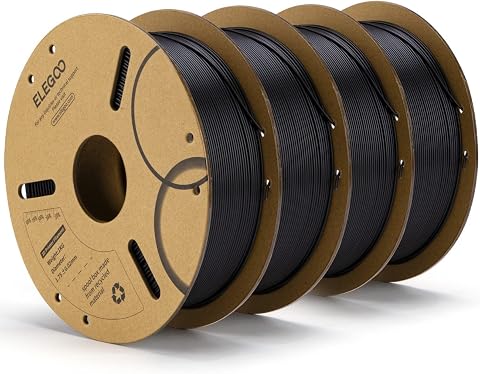
- The top-ranked 3D printers under 500 balance ease of use with reliable performance.
- Auto-leveling and high-speed capabilities are common features that improve user experience.
- Build volume varies significantly; larger sizes often come with increased complexity or cost.
- Multi-color and high-temperature features are present but often in models with tradeoffs in speed or size.
- The best value options tend to sacrifice some advanced features for core printing performance.



| 3d printers under 500 | Build Volume | Print Speed |
|---|---|---|
| Bambu Lab P1S 3D Printer | — | — |
| Creality SPARKX i7 3D Printer | 260×260×255 mm | 500mm/s |
| FLASHFORGE AD5M 3D Printer wit | 220x220x220mm | 600mm/s |
| Creality Ender 3 V3 SE Beginne | 250mm x 250mm x 250mm | 250mm/s |
| FLASHFORGE Adventurer 5M 3D Pr | — | — |
| FlashForge Adventurer 5M 3D Pr | — | — |
| Creality Ender-3 V3 KE 3D Prin | — | 500 mm/s |
| FLASHFORGE AD5X Multi-Color 3D | 220 x 220 x 220mm | — |
| FlashForge AD5M 3D Printer Ful | — | — |
| Bambu Lab A1 3D Printer | — | — |
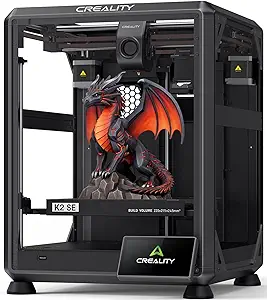
| Creality K2 SE 3D Printer | 220×215×245mm | 500mm/s |
| ELEGOO Centauri Carbon 3D Prin | 256x256x256 mm | 500 mm/s |
More Details on Our Top Picks
Bambu Lab P1S 3D Printer, Ready-to-Use FDM 3D Printer
The Bambu Lab P1S stands out for its vibrant multi-color and multi-material capabilities, making it ideal for users who want complex, visually striking prints. Its high-speed of 500mm/s and rapid setup in just 15 minutes provide a clear advantage over slower, more traditional models like the Ender 3 V3 SE. The automatic bed leveling simplifies operation for all skill levels, but its reliance on the Bambu Lab AMS for multi-color printing adds some dependency and extra cost. While it supports a wide array of filaments, it’s not recommended for reinforced carbon or glass fiber materials, which are often used for more demanding projects. This printer is best suited for creative hobbyists and small-scale professionals who prioritize speed and multi-color options.
Pros:- Vibrant multi-color/multi-material printing
- High-speed printing for quick results
- Automatic bed leveling simplifies setup
- Quick 15-minute assembly
Cons:- Requires connection to Bambu Lab AMS for multi-color printing
- Not suitable for carbon or glass fiber reinforced filaments
Best for: Hobbyists and small studios seeking fast, multi-color printing with simple setup
Not ideal for: Users needing to print with fiber-reinforced filaments or seeking a standalone multi-color solution without additional accessories
- Color Capabilities:Up to 16 colors
- Speed:500mm/s
- Acceleration:20000 mm/s²
- Design:Enclosed
- Auto Bed Leveling:Yes
- Setup Time:15 minutes
- Supported Filaments:PLA, PETG, TPU, PVA, PET, ABS, ASA; Capable: PA, PC; Not Recommended: Carbon/Glass Fiber
Our verdict“This model is perfect for creatives who want high-speed, multi-color prints with minimal hassle.”
Creality SPARKX i7 3D Printer, Multi-Color, Auto-Leveling, AI Camera, High Speed 500mm/s, 260×260×255 mm Build Volume
The Creality SPARKX i7 offers a compelling combination of speed, large build volume, and AI-powered features, making it a strong choice for serious hobbyists and small businesses. Its rapid 500mm/s print speed surpasses many competitors like the Ender 3 V3 SE, and the integrated AI camera allows for real-time monitoring and alerts, a feature not available on basic models. Its auto calibration and filament recognition streamline setup for users who want quick, efficient operation. However, some may find its advanced features complex or unnecessary if they prefer a straightforward printer. The limited detailed review data means potential buyers should verify the actual ease of use. This model suits experienced users seeking speed and automation in a larger-format printer.
Pros:- Fast 500mm/s printing speed
- AI camera for real-time monitoring
- Auto calibration and filament recognition
- Large build volume (260×260×255 mm)
Cons:- Requires CFS for multi-color printing
- Potentially complex setup for less experienced users
Best for: Intermediate to advanced hobbyists or small businesses needing fast, monitored, multi-color printing
Not ideal for: Beginners or those preferring a simple, plug-and-play experience without AI features
- Build Volume:260×260×255 mm
- Print Speed:500mm/s
- Dimensions:16.5 x 17.5 x 18.5 inches
- Item Weight:27.1 pounds
- Model Number:i7 Upgrade
Our verdict“Ideal for seasoned users who value speed, automation, and monitoring capabilities over simplicity.”
FLASHFORGE AD5M 3D Printer with Auto-Calibration and High-Speed Printing
The FLASHFORGE AD5M emphasizes speed and convenience, with a rapid 600mm/s print rate and automatic full-auto calibration, making it appealing for users who need quick turnaround and minimal setup. Its quick-swap nozzle system simplifies maintenance, and the customizable enclosure allows for better temperature control. Compared to slower models like the Ender 3 V3 SE, this printer excels in high-speed tasks but offers less detailed filament compatibility information, which could limit its versatility. Its high-speed capabilities sometimes come with tradeoffs in print accuracy or detail for smaller, delicate projects. This printer is best suited for users prioritizing fast prototyping and ease of use over ultra-fine detail.
Pros:- Very high print speed of 600mm/s
- Automatic calibration simplifies setup
- Quick-swap nozzle system for easy maintenance
- Customizable enclosure for controlled environment
Cons:- Limited filament detail info
- Potentially less precise for fine detail work
Best for: Prototypers and educators needing rapid turnaround with minimal fuss
Not ideal for: Users requiring high-precision or specialized filament compatibility for detailed or professional work
- Build Volume:220x220x220mm
- Print Speed:600mm/s
- Nozzle:3S Quick-Swap
- Calibration:1-Click Full-Auto
Our verdict“Best for those who need speed and ease, accepting some tradeoffs in fine detail quality.”
Creality Ender 3 V3 SE Beginner-Friendly 3D Printer with Auto Leveling
The Creality Ender 3 V3 SE remains a popular choice for newcomers thanks to its straightforward assembly and auto bed leveling with the CR Touch. Its moderate print speed of 250mm/s offers reliable results without the complexity of high-speed models like the FLASHFORGE AD5M, making it suitable for learning and small projects. Its upgraded Sprite Direct Drive Extruder ensures more consistent filament feeding, though some users report occasional issues with print quality or calibration. Its limited details on build volume and material support mean it’s better for basic, general-purpose printing. This printer is ideal for beginners who prioritize ease and reliability over speed or advanced features.
Pros:- Easy and quick setup with auto leveling
- Reliable extrusion with upgraded extruder
- Quiet operation for home use
- Good for learning and small projects
Cons:- Limited detailed specs on build volume and material compatibility
- Some users may experience inconsistent results
Best for: First-time 3D printers users and educational settings seeking straightforward operation
Not ideal for: Experienced users requiring high-speed printing or large build volume for complex projects
- Print Speed:250mm/s
- Build Volume:250mm x 250mm x 250mm
- Auto Leveling:CR Touch
- Extruder:Sprite Direct Drive
- Dimensions:15 x 19.6 x 15 inches
- Weight:19.8 pounds
Our verdict“This model fits beginners looking for a reliable, easy-to-use 3D printer with auto leveling.”
FLASHFORGE Adventurer 5M 3D Printer, 600mm/s High-Speed, Fully Auto Leveling, Upgraded Direct Extruder, 280°C Nozzle, Dual-Sided PEI Coating Plate, 220x220x220mm Print Size
The FLASHFORGE Adventurer 5M excels in speed, with a maximum of 600mm/s, and offers fully automatic bed leveling, making it suitable for those who need rapid production and consistent results. Its upgraded direct extruder with a high-temperature 280°C nozzle broadens filament compatibility, including some flexible and specialty filaments. The dual-sided PEI coating plate enhances print adhesion and ease of removal. Compared with the FLASHFORGE AD5M, the 5M’s focus on speed and advanced extruder design makes it more versatile, though its larger size and weight could be restrictive for smaller spaces. Its setup might be complex for absolute beginners. This printer is best for experienced users or educators demanding high-speed, reliable printing with advanced features.
Pros:- Rapid 600mm/s print speed
- Fully automatic bed leveling
- High-temp 280°C nozzle for versatile filaments
- Dual-sided PEI plate for easy print removal
Cons:- Relatively large and heavy
- Setup may be complex for beginners
- Limited detailed review info
Best for: Advanced hobbyists and educators prioritizing speed and filament versatility
Not ideal for: Those new to 3D printing or with limited space, due to its size and complexity
- Product Dimensions:14.29 x 15.83 x 17.64 inches
- Item Weight:23.8 pounds
- Print Size:220x220x220mm
- Max Speed:600mm/s
- Nozzle Temperature:280°C
- Heating Power:50W
Our verdict“Ideal for users who need fast, reliable, and versatile printing in a larger workspace.”
FlashForge Adventurer 5M 3D Printer with Auto Leveling and High-Speed Printing
The FlashForge Adventurer 5M stands out for its combination of high-speed capabilities and convenient features like automatic bed leveling and app monitoring. While it shares the large 220x220x220mm build size with the AD5X, its core XY metal structure offers greater stability during rapid printing up to 600mm/s, making it ideal for users needing quick turnarounds. However, this speed comes with a tradeoff: its maximum print size is limited compared to larger models, and the advanced features may require some familiarity with 3D printing tech. Compared to the AD5X, the Adventurer 5M emphasizes speed and automation, but at a potentially higher cost and with a slightly smaller build volume.
Pros:- Automatic bed leveling ensures consistent first layers
- High-speed printing up to 600mm/s reduces production time
- Easy nozzle changes and real-time remote monitoring
Cons:- Limited maximum print volume of 220x220x220mm
- Requires familiarity with advanced 3D printing features
- Potentially higher cost due to high-speed tech
Best for: Hobbyists and professionals who prioritize fast, reliable prints with minimal setup effort
Not ideal for: Beginners or those needing larger build sizes, as the 220mm cube may be limiting for bigger projects and the advanced features could be complex
- Print Size:220x220x220mm
- Max Speed:600mm/s
- Extruder Temperature:280°C
- Nozzle:3S Detachable Nozzle
- Structure:CoreXY All Metal
- Auto Leveling:Yes
Our verdict“This printer is best suited for users who need rapid, precise prints and are comfortable with more advanced features.”
Creality Ender-3 V3 KE 3D Printer, 500 mm/s High-Speed Printing with Auto-Leveling, Sprite Direct Extruder Supports 300°C, 220×220×250 mm Print Volume
The Creality Ender-3 V3 KE is designed to balance high-performance features with user-friendly setup, supporting speeds up to 500mm/s and automatic calibration via CR Touch. Compared to the AD5X, it offers a slightly larger vertical print capacity (250mm), making it more versatile for taller projects. Its support for a wide range of filaments, including ABS and TPU, enhances its flexibility. However, the high speed can be challenging for detailed, fine-layer prints unless users are experienced. Its straightforward assembly and setup make it an attractive option for newcomers, though some may find the maximum print volume still limiting for larger models.
Pros:- High-speed printing up to 500mm/s reduces wait times
- Auto-leveling with CR Touch sensor ensures easy calibration
- Supports multiple filament types including ABS, PETG, TPU, and PLA
- Simple 10-minute setup with all-in-one design
Cons:- High speed may complicate detailed or delicate prints
- Limited to a 220×220×250 mm build volume
Best for: Hobbyists and beginners who want a fast, reliable, easy-to-setup 3D printer with versatile filament support
Not ideal for: Advanced users requiring larger build volumes or ultra-fine detail, as the speed may compromise intricate print quality
- Print Volume:220×220×250 mm
- Max Printing Temperature:300°C
- Print Speed:500 mm/s
- Weight:21.7 pounds
- Dimensions:17.04 x 14.41 x 19.29 inches
- Item Model Number:Creality Ender 3 V3 KE
Our verdict“Ideal for beginners and hobbyists who want quick, versatile printing without complex setup.”
FLASHFORGE AD5X Multi-Color 3D Printer with Auto Leveling and High-Speed Printing
The FLASHFORGE AD5X excels in multi-color printing, supporting up to four colors simultaneously, which makes it stand out from the others focused on single-material or simple color prints. Its large build volume of 220 x 220 x 220mm and speed of up to 600mm/s enable complex, vibrant models with efficiency. The all-metal Core XY structure provides stability during rapid multi-color layers, but this complexity can lead to a steeper learning curve, especially for beginners. Compared to the single-color AD5M, the AD5X offers richer creative possibilities but requires more calibration and setup effort.
Pros:- Supports multi-color printing with up to four colors
- Auto leveling and intelligent filament management ease use
- High-speed printing up to 600mm/s
- Large build volume supports complex projects
Cons:- Complex features may challenge beginners
- High-speed printing requires careful calibration
Best for: Artists, designers, and hobbyists interested in multi-color, detailed models and larger projects
Not ideal for: Beginners seeking straightforward, single-color printing, as multi-color features add complexity
- Maximum Printing Speed:600mm/s
- Build Volume:220 x 220 x 220mm
- Nozzle Temperature:up to 300°C
- Printing Technology:FDM
- Color Capabilities:Multi-Color (4 colors)
- Supported Materials:Flexible TPU
Our verdict“Perfect for creative users who want vibrant, multi-color prints with efficient high-speed capabilities.”
FlashForge AD5M 3D Printer Fully Auto Calibration with Max 600mm/s Speed, All-Metal CoreXY Structure, Quick-Swap Nozzle, Print Size 220x220x220mm
The FlashForge AD5M offers a blend of automation and speed, with its one-click auto leveling and quick-swap nozzles making it suitable for frequent use. Its sturdy all-metal CoreXY frame and 600mm/s max speed create an environment for rapid, precise printing, comparable to the Adventurer 5M, but with added maintenance convenience. While its heavier weight and complex setup might challenge absolute beginners, professionals will appreciate the ease of quick nozzle changes and remote control features. Compared to the AD5X, the AD5M emphasizes ease of maintenance and durability for intensive use, though it may require a more experienced user to optimize performance fully.
Pros:- Automatic one-click leveling simplifies setup
- High-speed printing up to 600mm/s
- Quick-swap nozzles facilitate maintenance
- All-metal frame enhances durability
Cons:- Heavy weight reduces portability
- Setup and calibration may challenge beginners
Best for: Professional users or hobbyists needing high-speed, reliable, and low-maintenance printing solutions
Not ideal for: Absolute beginners or users with limited space, since its weight and setup complexity can be a concern
- Product Dimensions:15.83 x 14.29 x 17.64 inches
- Item Weight:22 pounds
- Print Size:220x220x220mm
- Max Speed:600mm/s
- Nozzle Diameters:0.25/0.4/0.6/0.8 mm
- Warranty:Details available via manufacturer
Our verdict“Designed for users who require fast, reliable, and low-maintenance printing with professional-grade features.”
Bambu Lab A1 3D Printer, Ready-to-Use FDM 3D Printer for Beginners and Kids
The Bambu Lab A1 stands out for offering a combination of high-speed, precise printing with user-friendly features like automatic calibration and quiet operation. Compared to the ELEGOO Centauri Carbon, it’s simpler to set up and maintain, making it a better fit for those new to 3D printing or printing with kids. Its support for multi-color printing, via an optional module, expands creative possibilities without adding complexity. However, the need to purchase the AMS lite separately and its relatively larger footprint mean it’s not the most compact choice or the best value for minimalists. This model is ideal for beginners who want reliable, versatile performance without a steep learning curve.
Pros:- High-speed and precise printing performance
- Automatic calibration simplifies setup
- Supports multi-color printing with optional module
- Quiet operation with noise canceling
Cons:- Requires additional purchase of AMS lite for multi-color printing
- Relatively large footprint may not fit small workspaces
Best for: Beginners and families seeking an easy-to-use, versatile 3D printer with multi-color options
Not ideal for: Space-constrained environments or users who prefer built-in multi-color support without extra purchases
- Product Dimensions:21.76 x 20.83 x 12.87 inches
- Item Weight:22 pounds
- ASIN:B0D17TMWFB
- Date First Available:May 17, 2024
Our verdict“This printer suits beginners and casual users looking for a reliable, multi-color capable machine with minimal fuss.”
Creality K2 SE 3D Printer, 500mm/s High-Speed, Multi-Color Support, Auto Leveling, Solid Metal Build, 220×215×245mm Print Size
The Creality K2 SE is built for speed, capable of printing up to 500mm/s, making it stand out among the lineup for rapid prototyping and large-volume projects. Its solid die-cast aluminum frame ensures stability, which is essential at such high speeds, and the automatic bed leveling reduces setup time. Compared with the ELEGOO Centauri Carbon, it offers a larger build volume and quicker print speeds, though its complexity might challenge absolute beginners despite the auto leveling feature. The support for multi-color printing via the CFS system adds creative flexibility but involves an extra purchase, similar to the Bambu Lab A1. This model is better suited to users with some experience who prioritize speed and large build areas.
Pros:- Exceptional print speeds up to 500mm/s
- Stable, solid metal frame for precision at high speeds
- Auto bed leveling simplifies initial setup
- Supports multi-color printing with additional system
Cons:- Requires extra purchase for multi-color system
- Large size demands ample workspace
- Potentially complex for absolute beginners
Best for: Intermediate users and professionals needing fast, stable prints with multi-color options
Not ideal for: Complete beginners who might find the setup and multi-system requirements overwhelming
- Print Speed:500mm/s
- Build Volume:220×215×245mm
- Build Material Support:Multi-color, various filaments
- Frame Material:Die-cast aluminum alloy
- Auto Leveling:Yes
- Extruder Type:Direct drive
Our verdict“This printer is a strong choice for users who need speed, stability, and larger build capacity, accepting some complexity in setup.”
ELEGOO Centauri Carbon 3D Printer, CoreXY 500mm/s High Speed Printing with Auto Calibration, 320°C Nozzle, Built-in Camera, 256x256x256mm Build Volume
The ELEGOO Centauri Carbon excels in delivering high-speed, high-precision prints with a robust CoreXY design. Its built-in camera provides real-time monitoring, a feature that enhances control during complex or long-duration projects, and it supports advanced filaments thanks to its high-temperature hotend. Its large build volume sets it apart from most in this price range, like the Bambu Lab A1, which has a smaller footprint. However, achieving optimal results at 500mm/s can require careful calibration, and the enclosed chamber might complicate maintenance or filament changes. The advanced features make it suited for users comfortable with a slightly steeper learning curve or those who want to produce detailed, high-quality parts efficiently.
Pros:- High-speed printing up to 500 mm/s with stable quality
- Built-in camera for remote monitoring and control
- Auto bed leveling for easy setup
- Enclosed chamber supports advanced filaments like carbon fiber
Cons:- High-speed printing requires careful calibration
- Enclosed design may limit accessibility during maintenance
- Steeper learning curve for complete beginners
Best for: Experienced makers and professionals needing fast, precise, and monitored printing with flexible filament options
Not ideal for: Beginners or those seeking a simpler, open-frame design without the complexity of enclosed chambers
- Build Volume:256x256x256 mm
- Max Nozzle Temperature:320°C
- Print Speed:500 mm/s
- Frame:Die-cast aluminum
- Display:Touchscreen
- Features:Auto bed leveling, built-in camera, dual LED lighting
Our verdict“This printer offers a compelling combination of speed, precision, and monitoring for experienced users ready to tackle a slightly complex setup.”

How We Picked
Our evaluation focused on performance, usability, build quality, and value for money within the under-500 price range. We prioritized models with reliable auto-leveling, consistent print quality, and user-friendly features suitable for hobbyists and beginners alike. Durability and ease of maintenance also played a role, as well as versatility—such as support for multiple filament types or multi-color printing. Products were ranked based on a combination of these factors, emphasizing real-world applicability over purely technical specs, ensuring each option offers a distinct advantage for different buyer needs.Factors to Consider When Choosing 3d Printers Under 500
Choosing the right 3D printer under 500 involves balancing several key factors. While affordability is a priority, features like build volume, ease of setup, and printing speed greatly influence overall satisfaction. Understanding your specific needs—whether for hobby projects, educational use, or small-scale prototyping—can help narrow your options. Below are the main factors to consider when selecting a 3D printer in this budget range, along with broader insights into common tradeoffs.Build Volume and Size
Build volume determines how large your prints can be, which is often a limiting factor in budget models. Larger sizes allow more ambitious projects but may increase complexity or cost. For most hobbyists, a build volume around 220x220x250mm offers a good balance of space and manageability. Smaller printers are more portable and easier to maintain but restrict the scope of your projects. Consider your typical project size and storage space when evaluating options.
Print Quality and Speed
Speed is appealing but often comes at the expense of print quality. Many budget models offer high-speed options (up to 500mm/s), but this can lead to lower resolution or rougher finishes. Auto-leveling features improve accuracy and reduce setup time, especially for beginners. For detailed or precision prints, prioritize models with stable motion systems and good extrusion control, even if they print slightly slower.
Ease of Use and Setup
Beginners benefit greatly from plug-and-play features like auto-calibration, touchscreen interfaces, and pre-assembled or semi-assembled units. These features reduce the learning curve and minimize troubleshooting. Conversely, more manual setups may save money but require more technical skill, risking frustration or errors. Think about how comfortable you are with maintenance and calibration when choosing your model.
Material Compatibility and Temperature
Most budget printers support PLA, but if you plan to use ABS or PETG, check for higher temperature capabilities (support for 250°C+ nozzles). Multi-material support adds versatility but can increase complexity. Also, consider if the printer has an enclosed design for better temperature control and safety, especially when printing with higher-temperature filaments.
Additional Features and Future Proofing
Features like multi-color printing, filament sensors, or Wi-Fi connectivity can enhance usability but may be limited in models under 500. Focus on core features first, but if you foresee expanding your skills or projects, these extras can be valuable. Remember, some features may add complexity, so weigh their benefits against your comfort level with technical setups.
Frequently Asked Questions
Can I print with ABS or PETG on a budget 3D printer?
Many budget 3D printers primarily support PLA due to its lower printing temperature and ease of use. Printing with ABS or PETG often requires higher temperature nozzles (above 240°C) and better temperature control, which not all under-500 models can provide reliably. If you plan to print with these materials regularly, look for models that support higher temperatures and have enclosed chambers or good ventilation to manage fumes and warping.
Are auto-leveling features worth it in this price range?
Auto-leveling significantly reduces setup time and improves print success, especially for beginners unfamiliar with manual calibration. In the under-500 range, models with auto-leveling tend to produce more consistent first layers, leading to fewer failed prints. While they add some cost, the time saved and the increased reliability often justify the investment for hobbyists and newcomers alike.
Is larger build volume always better for my projects?
Not necessarily. A larger build volume allows for bigger prints but often means a more complex, larger, and potentially more expensive machine. For most small-to-medium projects, a build size around 220x220x250mm is sufficient and easier to manage. Consider your typical project size and available space before prioritizing larger dimensions, as they can also increase setup and calibration time.
How important is print speed in choosing a budget 3D printer?
Print speed can be tempting, but higher speeds (500mm/s) often compromise print quality and can cause issues like layer misalignment. Most hobbyists find that moderate speeds (around 50-100mm/s) produce better results. If you need quicker prints regularly, look for models that optimize speed without sacrificing too much detail, but remember that a balanced approach usually yields the best overall experience.
Should I prioritize multi-color support or higher temperature capabilities?
Both features add versatility but come with tradeoffs. Multi-color support allows for more complex projects but often increases the printer’s complexity and cost. Higher temperature support expands material options but may require more advanced components. For beginners or those on a strict budget, focusing on auto-leveling, build volume, and ease of use tends to be more practical, with multi-color or high-temp features considered as future upgrades.
Conclusion
For most users, the Bambu Lab P1S offers the best overall experience with reliable features and ease of use, making it a great choice for hobbyists and beginners. Those seeking the best value without sacrificing core performance might prefer the Creality Ender 3 V3 SE, which balances affordability with essential features. If you’re a newcomer or printing primarily small models, the Fully Assembled Mini 3D Printer provides simplicity and speed. For advanced users needing higher temperature support or multi-color printing, models like the ELEGOO Centauri Carbon cater to more specific needs but might require more technical setup. Ultimately, your choice depends on your project scope, experience level, and future goals.