TL;DR
Prebuilt AI workstations now often match or beat DIY builds on price thanks to market shortages and bulk buying. They offer faster deployment, tested thermals, and support, but lack the customization of a self-built machine. Your choice depends on your budget, skills, and how quickly you need to start working.
Imagine plugging in your new AI workstation, powering it up, and immediately diving into training models or inference tasks. No fuss. No assembly. Just ready-to-go performance. That’s the promise of a prebuilt system today.
But if you love tinkering, customizing, and optimizing every component, building your own might still appeal. The question is no longer just about cost or convenience—it’s about what you value most: speed, support, flexibility, or control. In 2026, market shifts have reshaped this debate, making the decision more nuanced than ever. For example, build vs buy guides can help clarify your options.
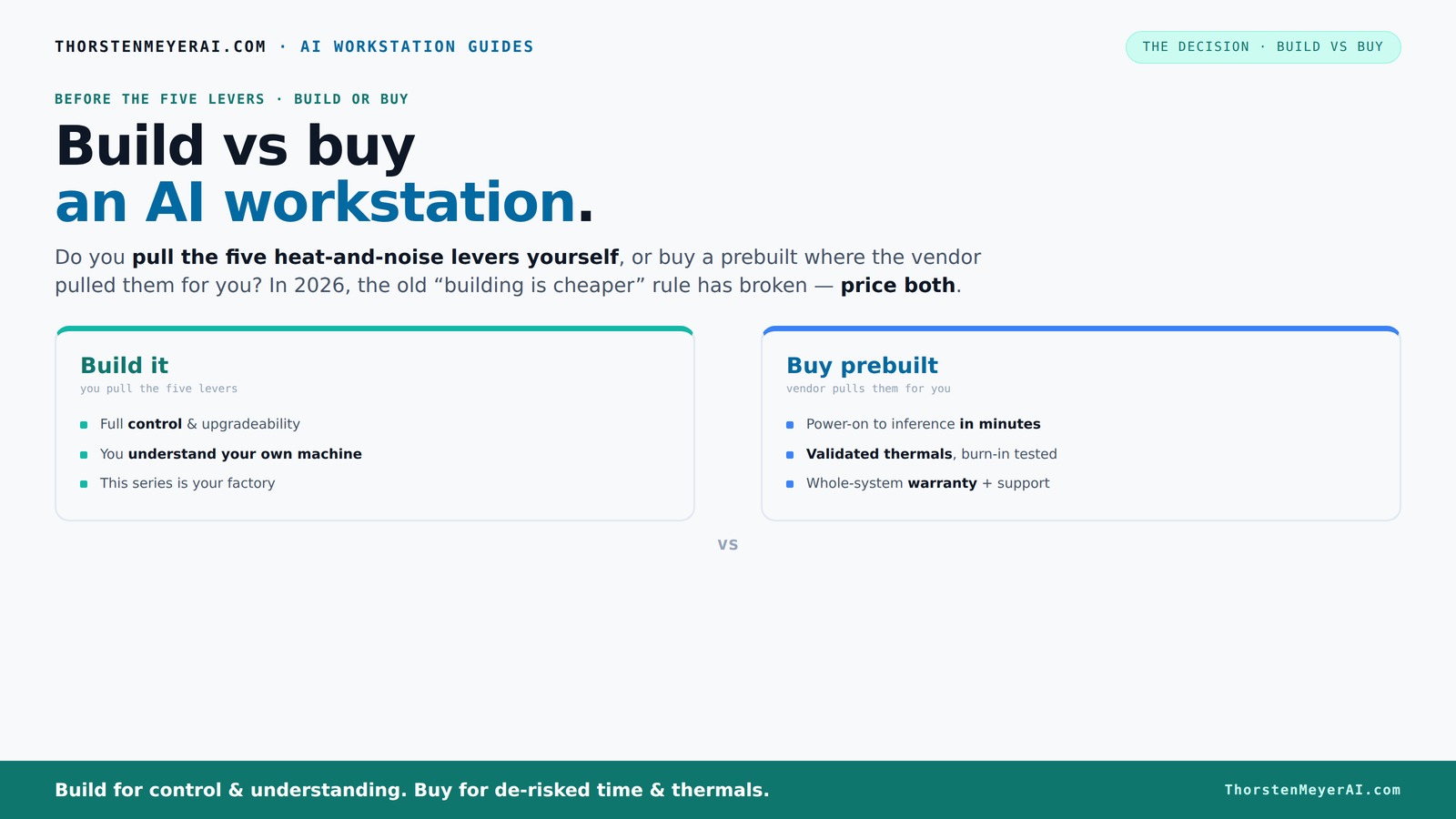
Build vs buy
an AI workstation.
The real question behind this whole series: do you pull the five heat-and-noise levers yourself, or buy a prebuilt where the vendor pulled them for you? And in 2026, the old “building is cheaper” rule has broken. Match your situation in Part 3.
Key Takeaways
- Component shortages and bulk buying in 2026 have narrowed the price gap, making prebuilt AI workstations often as affordable as DIY builds.
- Prebuilts save time, reduce setup risk, and come with tested thermals and support—ideal for quick deployment and professional use.
- DIY offers full customization, upgrade flexibility, and potentially better component choices, but requires more time and know-how.
- Proprietary parts in some prebuilts can complicate future upgrades—check compatibility before buying.
- Your decision depends on workload, technical skill, budget, and how quickly you need to start working.

Dell ECT1250 Tower Desktop Computer - Intel Core Ultra 5 225 Processor, 16GB DDR5 RAM, 512GB NVMe SSD, Intel UHD Graphics, Wi-Fi 6 & Bluetooth 5.4, Keyboard & Mouse, AI Copilot, Windows 11 Pro
- Processor: Intel Core Ultra 5-225 10-Core
- Memory: 16GB DDR5 RAM
- Storage: 512GB NVMe SSD
As an affiliate, we earn on qualifying purchases.
As an affiliate, we earn on qualifying purchases.
Why 2026 Changes Everything About Cost and Speed
Building your own AI workstation used to be the cheaper route. Not anymore. The global chip shortage, high demand for GPUs, and supply chain disruptions have driven component prices through the roof. A DIY build that once cost under $1,000 now easily exceeds $1,250 before you even add software.
Meanwhile, prebuilt manufacturers have stockpiled parts early, leveraging bulk discounts. They can offer systems that match or beat the DIY price—sometimes even with premium cooling and support included. This market twist means you need to actually price both options today, not assume DIY always wins.
So, is building cheaper? Usually not. But it depends on your goals: do you want to save every dollar, or do you want guaranteed performance with support? That’s the new tradeoff in 2026.
For example, a hobbyist who previously could build a capable AI workstation for under $1,000 might now find that they need to spend over $1,500 due to GPU shortages and inflated prices. Conversely, a small startup purchasing prebuilt systems in bulk could secure a ready-to-deploy AI server at a comparable or even lower cost than assembling it piecemeal, thanks to vendor discounts and tested configurations. These scenarios illustrate how market dynamics are shifting the traditional cost calculus, emphasizing the importance of specific needs over assumptions.
The Five Levers: Who Controls the Heat and Noise?
Building or buying? The real difference is who pulls the five levers for thermal and acoustic performance. These levers are: undervolting the GPU, choosing the right cooler, optimizing airflow, tuning fan curves, and proper placement.
If you buy a prebuilt, the vendor handles these. Companies like Lambda or BIZON test, tune, and validate thermals before shipping, often using water cooling for quieter operation. They guarantee your system won’t throttle under load—saving you hours of troubleshooting. Learn more about home robotics and automated solutions for efficient workflows.
If you build, you control every knob. You select a quiet GPU, like the RTX 4060 Ti, undervolt it using tools like this guide, pick a low-noise cooler, and set up airflow with these tips. For example, choosing a blower-style GPU with a custom fan curve can significantly reduce noise, but requires understanding how to tune these parameters effectively. This control allows you to tailor your system for quiet operation in a shared workspace or a noise-sensitive environment, but it also involves a learning curve and trial-and-error, which might not be suitable for everyone.
When Buying a Prebuilt Makes Sense — Fast, Reliable, and Worry-Free
If you need your AI rig immediately, prebuilt is the way. Systems arrive ready with OS, drivers, and AI frameworks like CUDA, PyTorch, or TensorFlow installed. No sourcing parts, no BIOS fiddling, no troubleshooting.
Support is another big plus. A reputable vendor offers warranties—like 24-48 hours burn-in testing and service plans that cover hardware failures. For high-stakes projects, that peace of mind can outweigh the extra cost.
For example, a research team needing rapid deployment for a time-sensitive project benefits from prebuilt systems that are tested and ready to run out of the box. Similarly, companies with limited IT support can rely on vendor warranties to minimize downtime, ensuring their AI pipelines stay operational without the need for in-house troubleshooting. This reliability and speed can be critical when deadlines or project scopes are tight, making prebuilt systems an attractive choice despite their higher initial cost.
Building Your Own: When It’s Still the Better Bet
If you love hardware, enjoy learning, or want total control, DIY still rules. For a hobbyist or student, building can be a rewarding puzzle—plus, you often get better parts for the money, especially if you’re patient and savvy with sourcing.
Choose a quiet GPU, undervolt it, and match the cooling to your case. For instance, selecting a blower-style GPU like the RTX 3080 or 3090 can help reduce noise in a confined space, but requires careful tuning. The process can take time, but it pays off with a system tailored precisely to your needs. Moreover, building allows you to select components that match your specific workload — for example, opting for a high-capacity SSD for large datasets or a specialized cooling setup for overclocking.
Plus, DIY offers upgrade flexibility. If you want to replace the GPU or add more RAM later, you’re not locked into proprietary connectors or limited upgrade paths common in some prebuilts. For more tips, see build vs buy guides.
Cost Breakdown: Why Price Isn’t Always What It Seems
Let’s compare the real numbers. A prebuilt AI workstation—like those from Lambda or Puget—can cost between $3,000 and $5,000, often including support, warranty, and pre-installed software. Building a comparable rig might seem cheaper, but with current market prices, parts alone can push $3,000, especially with recent GPU shortages. For more insights, visit PoolTrove.
Hidden costs in DIY include time, troubleshooting, and potential compatibility issues. If you factor in your hourly rate or opportunity cost, the DIY option might actually be more expensive in the end. For example, spending several weekends troubleshooting driver conflicts or BIOS issues can add up to hundreds of dollars in lost productivity.
Here’s a quick comparison:
Upgradeability and Proprietary Parts — What to Watch For
Prebuilts often use proprietary connectors or custom-modified components—think special power supplies or motherboard layouts. That can limit future upgrades or repairs. For instance, some systems use custom-shaped power supplies that won’t fit standard ATX cases, forcing you to buy from the same vendor for replacements.
In contrast, a DIY build with a standard ATX case, common PSU, and modular components makes upgrades easier. Want to swap in a better GPU or add more RAM? You’ll thank yourself later. Imagine upgrading from a GTX 1080 to an RTX 4080 in a standard case—it's straightforward and cost-effective, unlike proprietary systems that might require replacing the entire motherboard or case.
When choosing a prebuilt, check if the motherboard and PSU are standard. That makes future upgrades smoother, avoiding the trap of being locked into proprietary parts that can double or triple upgrade costs down the line.
Who Should Buy Prebuilt — And Who Should Build?
If quick deployment, support, and reliability matter most—especially for teams or pros—prebuilt often wins. It reduces setup time and offers professional validation. For example, a data scientist needing immediate access to a reliable system for model training might opt for a prebuilt with proven thermals and support plans.
On the other hand, if you love hardware, want to fine-tune performance, or have a tight budget, building your own can be more satisfying and cost-effective over the long run. Hobbyists who enjoy the process of selecting and assembling components often find it rewarding, and it can be cheaper if you’re willing to put in the effort and patience.
The key is matching your skills and needs: beginners and busy professionals lean toward prebuilt, while hobbyists and budget-conscious users prefer DIY. For instance, a university student with limited time might choose a prebuilt for immediate use, whereas an enthusiast aiming for maximum performance might build for the experience and customization.
Checklist: How to Choose the Right AI Workstation for You
- Define your workload: training, inference, or research?
- Set your budget — include support and future upgrades.
- Decide how much time you can spend on setup and tuning.
- Evaluate if you need multi-GPU support or specific thermal features.
- Compare prebuilt options and price them out.
- Assess upgrade paths—are parts standard or proprietary?
- Think about software: OS, drivers, and AI frameworks pre-installed?
Frequently Asked Questions
Is it cheaper to build or buy a prebuilt AI workstation?
With current market conditions in 2026, prebuilt AI workstations often match or beat DIY costs thanks to bulk purchasing and component shortages. However, your specific configuration and needs can tip the scales—always price both options for your exact specs.What do I lose by buying prebuilt instead of building myself?
You lose some control over component choices, thermal tuning, and upgrade flexibility. Proprietary parts can also limit future upgrades. But you gain convenience, tested thermals, immediate software setup, and support. This tradeoff can impact your ability to customize or extend your system later, which might be crucial for advanced users or those with future plans for hardware upgrades.What do I gain from buying prebuilt besides convenience?
A prebuilt system arrives ready to run, with support and warranty coverage. It’s tested for thermal performance under load, reducing the risk of throttling or hardware failures during critical AI workloads. This reliability is especially important for professional environments where uptime and stability directly impact productivity.Are prebuilt AI workstations reliable enough for professional work?
Yes. Reputable vendors test their systems extensively, often running burn-in procedures for 24–48 hours. They also provide warranties, so hardware failures are covered, making them suitable for demanding AI projects. Their testing procedures often simulate real workloads, ensuring thermal and power stability, which translates into consistent performance in professional settings.Can I upgrade a prebuilt AI workstation later?
It depends. Some prebuilts use proprietary parts, limiting upgrades. Standard, modular components make upgrades easier. Always check if the motherboard, PSU, and case support future expansion before buying. Upgradability can be a critical factor if you plan to extend your system’s lifespan or adapt to evolving project requirements, so investigate compatibility and hardware support thoroughly.Conclusion
In 2026, the choice between building and buying an AI workstation isn’t just about saving money. It’s about what matters most: speed, support, customization, or control. Consider your workload, skills, and timeline carefully.
The market has shifted—prebuilt systems now often match DIY costs and deliver immediate reliability. For many, that means a faster, safer route to AI productivity. But if you love hardware and tuning, building remains a rewarding challenge.